







How to Switch a Mini-Split From Heating to Cooling in Spring
Primary keyword: switch mini split from heat to cool
Secondary keywords: mini split seasonal changeover, mini split spring settings, heat pump auto mode spring
Suggested URL: /switch-mini-split-heat-to-cool
Meta title: How to Switch a Mini-Split From Heat to Cool
Meta description: Follow a simple seasonal changeover checklist before switching your mini-split from winter heating to spring and summer cooling.
Spring weather can move from cold mornings to warm afternoons within the same day.
That makes mini-split operation confusing, especially when several indoor units share one outdoor system.
A careful seasonal changeover can reduce mode conflicts, unexpected heating and unnecessary energy use.
Clean the Filters First
Before the cooling season begins:
- Turn the system off.
- Remove the reusable filters.
- Vacuum loose dust.
- Wash them only when permitted.
- Allow them to dry fully.
- Reinstall them correctly.
Restricted airflow can reduce cooling and contribute to indoor-coil icing.
Inspect the Outdoor Unit
Clear loose debris such as:
- Leaves
- Grass
- Plastic
- Snow remnants
- Weeds
- Storage items
Do not pressure-wash the coil or open electrical panels.
Select Cool, Not Fan
Look for the snowflake icon.
Fan mode circulates air but does not actively lower the room temperature.
Dry mode behaves differently and may not provide sufficient cooling on a hot day.
Allow Time Between Modes
Do not switch repeatedly from Heat to Cool and back again within a few minutes.
Many systems use a compressor-protection delay after a mode change.
Select the new mode and allow the equipment time to respond.
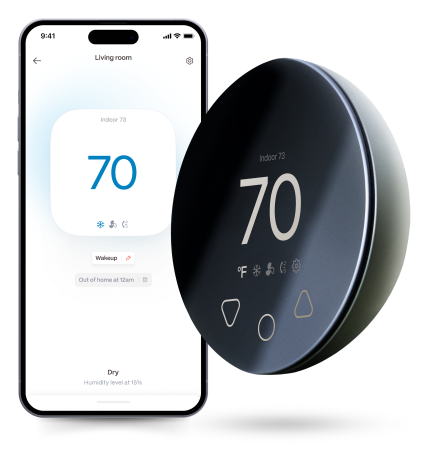
Compatible with all brands of ACs and Mini-Splits
Automate Climate Management
Control remotely
Reduce Energy Consumption
Monitor bills in realtimeKlima - Smart Home Thermostat for Mini-splits, Air Conditioners and Heatpumps
Check Every Indoor Head
On a multi-zone system, all operating indoor units may need to use compatible modes.
One bedroom remote left in Heat can conflict with a living-room unit requesting Cool.
Before switching seasons:
- Check every remote.
- Cancel old timers.
- Review app schedules.
- Confirm the mode in every room.
- Replace weak batteries.
Be Careful With Auto Mode
Auto mode may seem ideal for spring, but it can produce unwanted heating and cooling when daytime and nighttime temperatures vary.
Depending on the system, Auto can refer to:
- Automatic fan speed
- Automatic operating mode
- Automatic setpoint control
Review the manual before relying on it.
Test the Condensate Drain
Cooling produces water at the indoor coil.
During the first cooling test, check for:
- Indoor dripping
- Gurgling
- A noisy condensate pump
- Water stains
- Musty smells
Turn the system off if water appears inside.
Start With a Moderate Setpoint
Do not immediately choose the lowest available temperature.
Select a reasonable target several degrees below the current room temperature and observe the system.
Check whether:
- Air becomes cooler
- The outdoor unit starts
- The room temperature declines
- Water drains correctly
- Error codes appear
Stay cool and save more. Use code JONES15 to get 15% off your entire order—no strings attached.
Upgrade your comfort with a Klima today.
Frequently Asked Questions
Can I switch directly from Heat to Cool?
Yes, but allow the system’s required protection delay and avoid repeated rapid changes.
Why is one indoor unit refusing to cool?
Another unit may still be requesting Heat, or the system may be in a restart delay.
Should I leave it in Auto all spring?
Only after confirming how Auto behaves on the exact model.
Why does it smell when cooling starts?
Dust, moisture or internal contamination may become noticeable after seasonal changeover and should be investigated if persistent.


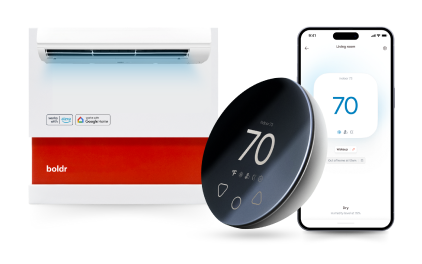
Klima - Smart Home Controller for Mini-splits, Air Conditioners and Heatpumps
Compatible with all brands of ACs and Mini-Splits Automate Climate Management Control remotely Reduce Energy Consumption Monitor bills in realtime
Try NowRecent Articles

Mini-Split Outdoor Unit Clearance 2026 Guide
A mini-split outdoor unit needs air. Lots of it. The condenser pull...
Read More
What Happens if Your Mini-Split Is Too Small?
Most homeowner sizing advice focuses on oversized mini-splits. But ...
Read More
Does a Mini-Split Need a Manual J Load Calculation?
A 500-square-foot room does not automatically need a 12,000 BTU min...
Read More
Signs Your Mini-Split May Have a Refrigerant Leak
A mini-split does not normally “use up” refrigerant the way a car u...
Read More
Mini-Split Minimum Capacity: Why It Matters
When homeowners compare mini-splits, they normally look at the bigg...
Read More